
Pipeline and deals
Deals
A deal is a potential sale with an amount, an owner and an expected close date. Pipeline shows the deals as cards in columns, one column per stage. Pipeline and deals are available to Sales reps, Sales managers and Administrators.
Create a deal
- From a lead: open the lead and select Convert to deal. The deal is created and opened.
- From scratch: select New and then New deal, or press
Cand thenA.
If the conversion fails you get a message and the lead is untouched. Try again.
Open and edit
Click a card to open the deal in a panel. There you edit amount, expected close, owner and other fields the same way as on other records, see Companies and contacts. From the deal you can select Create quote, see Quotes.
Add products
- Open the deal.
- Select Add product and choose the product in the list.
- Select Add.
The products come from the product catalogue. You can choose products but not change the catalogue.
The pipeline board
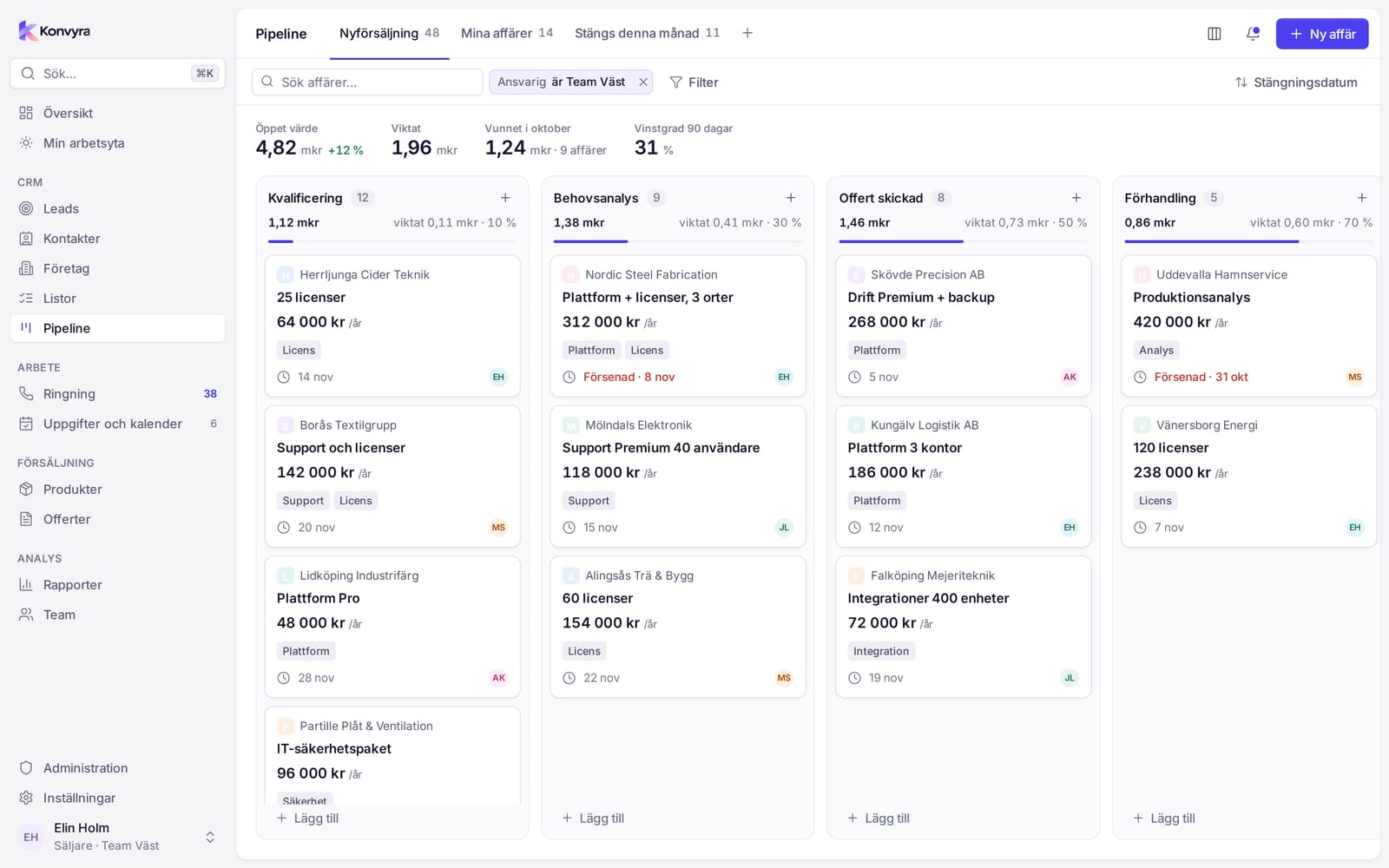
Select Pipeline in the sidebar. At the top you see four key figures:
- Open value: the sum of all open deals.
- Weighted value: each deal's amount times the probability of its stage.
- Won in the current month.
- Win rate, 90 days: won deals in relation to won and lost.
If there are several pipelines, choose which one to see with the tabs at the top. The number on the tab is the number of deals. Search deals and Filter narrow what is shown.
Each column is a stage. At the top of the column are the number of deals, the sum, the weighted value and the probability. Each card shows the company, the deal name, amount (with /mo or /yr for recurring products), expected close and owner. If the date has passed it says Overdue.
Move a deal
- On a computer: drag the card to another stage. The sums update immediately.
- On a phone: press and hold the card briefly and choose the stage under Move to ….
The deal's probability follows the new stage. If the move cannot be saved you get a message and the card goes back.
Won and lost stages
Every stage has a type: open, won or lost. If you move a deal to a won stage, the close date is set to today if it is missing. In Overview and Reports, deals in won and lost stages count as closed.
Set up pipelines
This is done by an Administrator. Select Set up pipeline at the top of the Pipeline page.
- Select Add pipeline and enter a name, or select Rename on an existing one.
- Select Add step to add a stage and give it a name.
- Change the Order of the steps with the move up and move down buttons.
- Select Save.
If you see No pipelines yet, no pipeline has been created. Ask an administrator to add one.